


Nowadays, a website is becoming more of a necessity when a company wants to reach out to its clients. Having a nice website is one of the criteria that many customers use to deem whether or not a company is legitimate.
When it comes to building a website, one of the most popular choices is WordPress. But did you know that there are two versions of WordPress: WordPress.com and WordPress.org?
Understanding the Basics of WordPress
To understand the difference between WordPress.com and WordPress.org, let’s first take a look at what WordPress is.
WordPress is a full content management system (CMS) that can manage every kind of site you could want. It’s open-source software, which means it’s free to use and receives consistent updates that add new features and polish existing ones.
WordPress has a simple-to-use interface, both as an administrator and content creator. The Gutenberg block editor is intuitive and allows full-site customisation immediately on installation.
Additionally, content can be designed around various structures, and the software has a full range of features, including blog post creation, static landing pages, media management, and user management.
Now that we know what WordPress does and why people use it to build their websites, let’s move on to why some people choose to do so on wordpress.com while others on wordpress.org.
WordPress.com vs WordPress.org: What’s the Difference?

Source: https://www.pexels.com/
So, what’s the difference between WordPress.com and WordPress.org?
The main difference lies in where the website will be hosted, where WordPress.com is a free website service, which is not the same as a free website software like WordPress.org.
For WordPress.com, you don’t have to download or install anything. Instead, all you’ll need to do is sign up for an account and create a site that will be hosted on WordPress.com.
On the other hand, WordPress.org refers to the self-hosted, independent, open-source version of the WordPress CMS.
Usually, the.org version of WordPress is often referred to as “self-hosted WordPress,” meaning that the software itself is free, but you must have a web host to install it on.
Pricing Comparison: WordPress.com vs WordPress.org
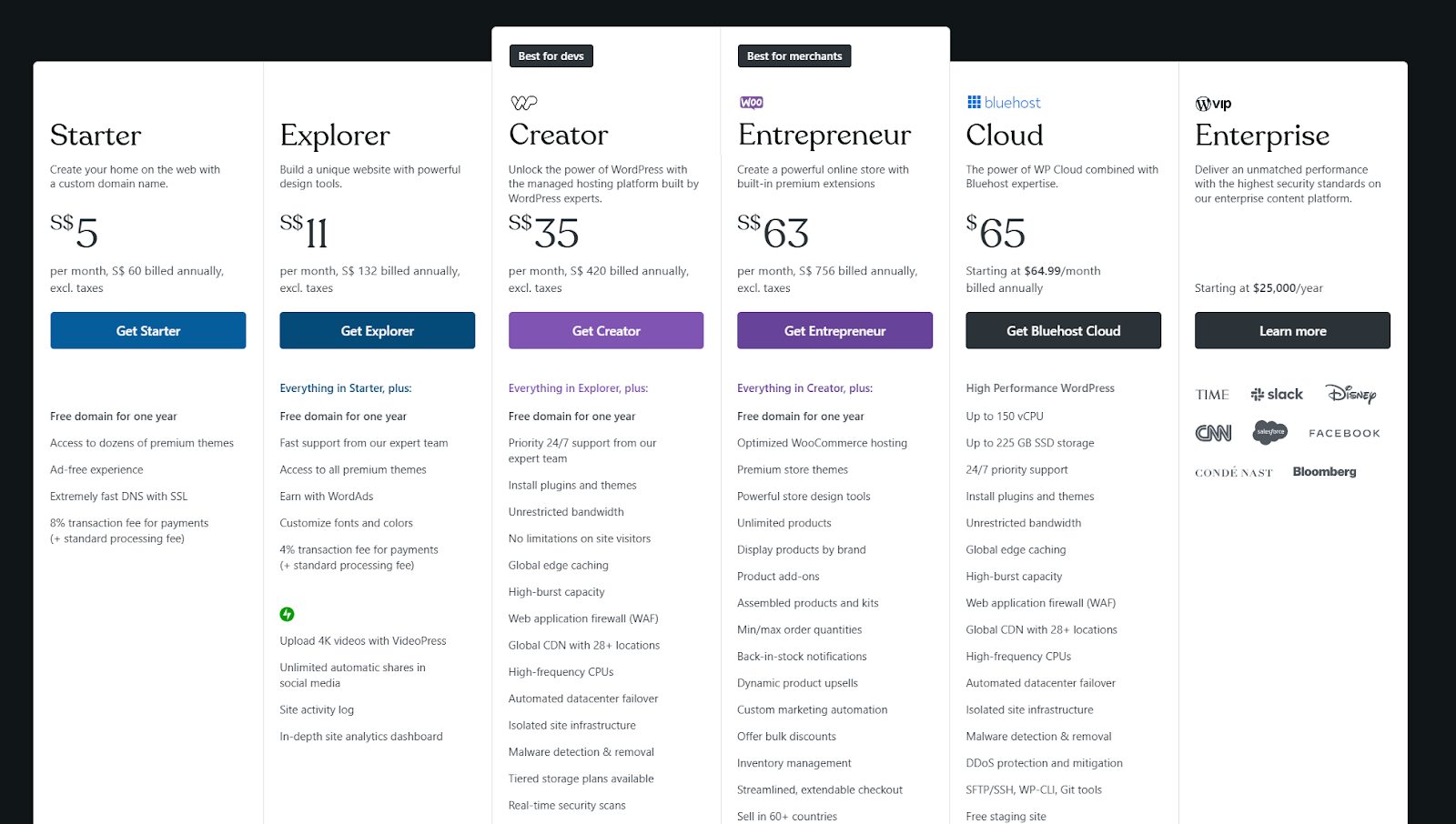
Source: WordPress.com Pricing and Plans | Start Building Today
WordPress.com offers a variety of plans, ranging from a free plan with basic features to a business plan with advanced features.
The free plan allows you to create a website with limited features and includes a WordPress.com subdomain, so those who’d like to see what they have to offer can freely try it..
The paid plans start from roughly $5 per month (billed annually) for a personal starter plan but for companies, especially those looking to have an e-commerce website, the price is subject to the scale of the website needed.
In contrast, for WordPress.org, the cost of web hosting can vary depending on the provider and the plan of your choice.
For example, some popular hosting providers like SiteGround and Green Geeks offer starter WordPress plans that start at around $2.99 per month, while other premium providers like WPEngine might start at $20 per month.
Additionally, you will need to pay for a domain name, which typically costs around $10 to $15 per year.
Functional Differences between WordPress.com vs WordPress.org
With the pricing out of the way, let’s now get into the functional differences between the 2 WordPress options and figure out which one suits which kind of web developer the most.
Freedom and Flexibility: WordPress.org’s Strong Suit
One of the biggest benefits of using WordPress.org is the freedom to do what you want, which is especially great for developers with more technical knowledge.
Outside of your hosting provider, you are not bound by any terms of service, content limitations, or what kinds of development, themes, or plugins you can use on your site. You always own your content, too.
WordPress.com: A Hassle-Free Experience
On the other hand, WordPress.com is a free, no-frills, no-hassle website service. From the moment you sign up, you’re walked through the process of setting up the site. Pick a name, URL, and theme, and then you’re free to start publishing content immediately.
Which To Pick: WordPress.com or WordPress.org?
Ultimately, whether you go with WordPress.com or WordPress.org, you still get to make use of WordPress to design your website.
WordPress.com is a great platform, but if you want anything else, it will cost you. If you have the budget for it and don’t want the responsibility, consider a WordPress.com site.
However, even though you have to pay separately for.org hosting, the cost is generally lower, and you can run more sites than just one on that hosting service, making it the choice of those with great back-end knowledge.